

Overview
Vehicle rentals and trips help Turo hosts, car-sharing operators, and small fleet owners keep rental activity connected to each vehicle. Use them when you want to track when a vehicle was rented, how many miles were added, what revenue came in, what costs followed, and which files or tasks belong with the trip.
This gives each rental vehicle a clearer operating record over time.
Start by choosing the right usage type
When you add or edit a vehicle, choose a usage type that matches how the vehicle is used, such as Short-term rental, Long-term rental, Fleet, or Business. Those usage types add the Rentals section to the vehicle page.
From there, you can track trips, mileage, files, tasks, revenue, and costs for that vehicle. Once trip records exist, they also feed rental reporting and Copilot questions.
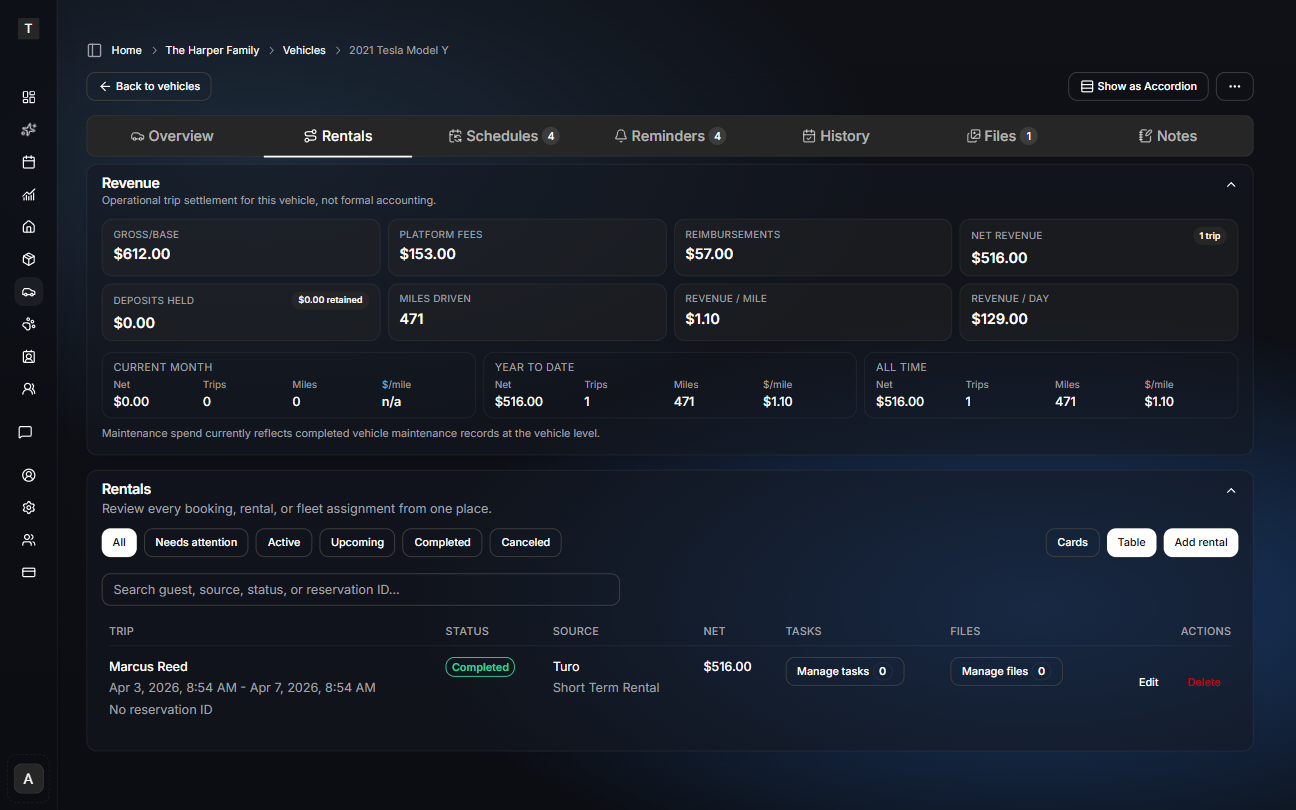
When to create a trip record
Create a trip record when a vehicle is used for a rental, booking, or shared-use period that you want to track separately from general maintenance.
A trip record can include:
- trip start and end dates
- trip status
- source or platform
- guest or customer context
- start and end odometer readings
- miles driven
- gross revenue
- fees, reimbursements, and costs
- net revenue
- trip-related files and tasks
Use maintenance history for completed service work, files for standalone documents, and notes for details you want to remember. Use trips when mileage, revenue, files, and follow-up work belong to a specific rental period.
Add trips from forwarded Turo confirmations
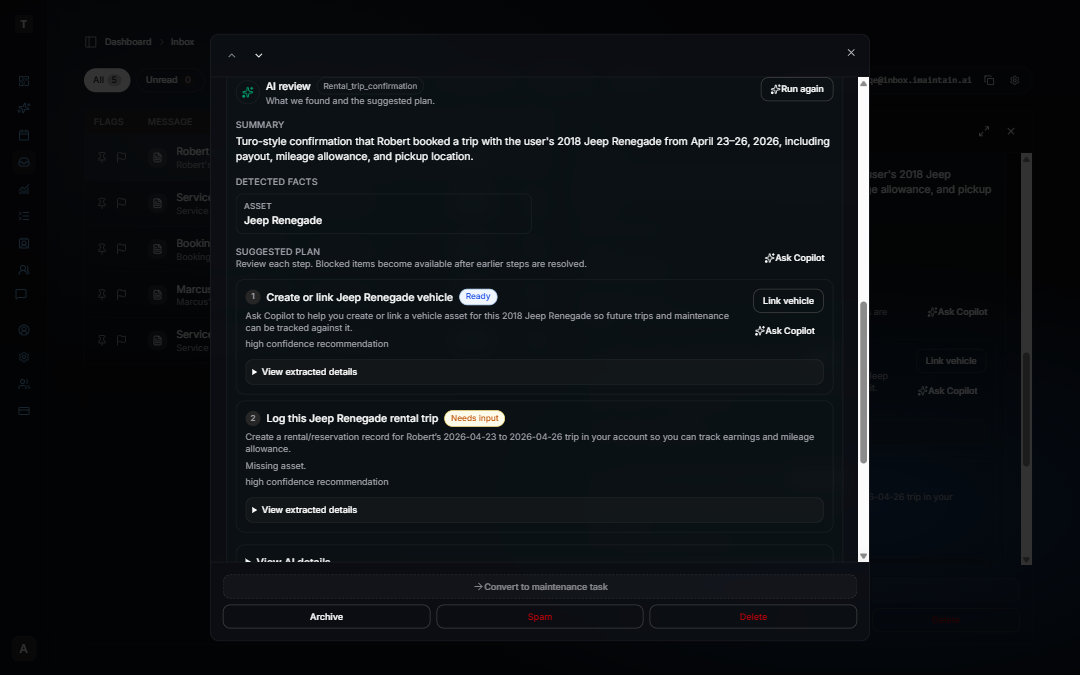
Forward a Turo trip confirmation to your iMaintain Inbox, then click Run analysis. iMaintain suggests linking the vehicle and reviewing a prefilled trip with guest, dates, reservation ID, earnings, and mileage allowance already filled in. Re-forward the same confirmation and iMaintain matches by reservation ID to update without duplicating the trip.
See How AI review and suggested plans work and Set up email forwarding.
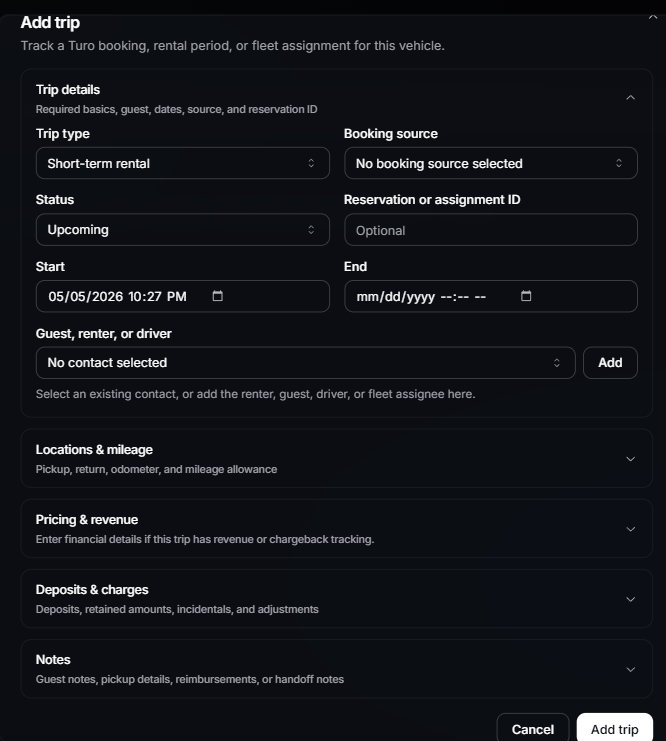
What to track
Each trip can capture the details that matter for rental operations:
- Dates and status: track when the trip starts, ends, and whether it is active, completed, canceled, or needs follow-up.
- Source: record whether the trip came from Turo, another car-sharing platform, direct rental, or internal use.
- Guest context: keep enough contact or customer context to understand the trip later.
- Mileage: capture start and end odometer readings so mileage-driven maintenance stays accurate.
- Financial details: track gross revenue, platform fees, reimbursements, maintenance or cleaning costs, and net revenue.
- Tasks and files: keep post-trip work, inspection photos, receipts, and supporting documents attached to the trip.
Files and photos
Trip files are most useful when they stay tied to the rental period they belong to. Common examples include:
- pre-trip and post-trip photos
- odometer photos
- inspection records
- cleaning receipts
- damage photos
- repair invoices
- toll, parking, or reimbursement documentation
Files still belong to the broader vehicle record, but linking them to a trip makes it easier to review what happened before, during, or after that rental.
Trip tasks
Rental-linked tasks help you manage the work that happens around each trip. Examples include:
- clean the vehicle after return
- inspect for damage
- upload post-trip photos
- review a reimbursement
- schedule maintenance after heavy mileage
- follow up on a repair
- collect missing documents
This is especially useful when multiple vehicles are active and follow-up work can easily get missed.
Mileage and maintenance
Rental trips can add mileage quickly. Tracking trip mileage gives you better context for maintenance decisions:
- which trips added the most miles
- which vehicles are nearing service intervals
- where revenue per mile is weak
- whether a vehicle is profitable after maintenance costs
- which vehicles may need inspection before the next booking
Mileage is not just a vehicle detail. For rental vehicles, it is part of the business record.
Rental reporting
The Vehicle Rental Performance report helps compare rental vehicles across the account.
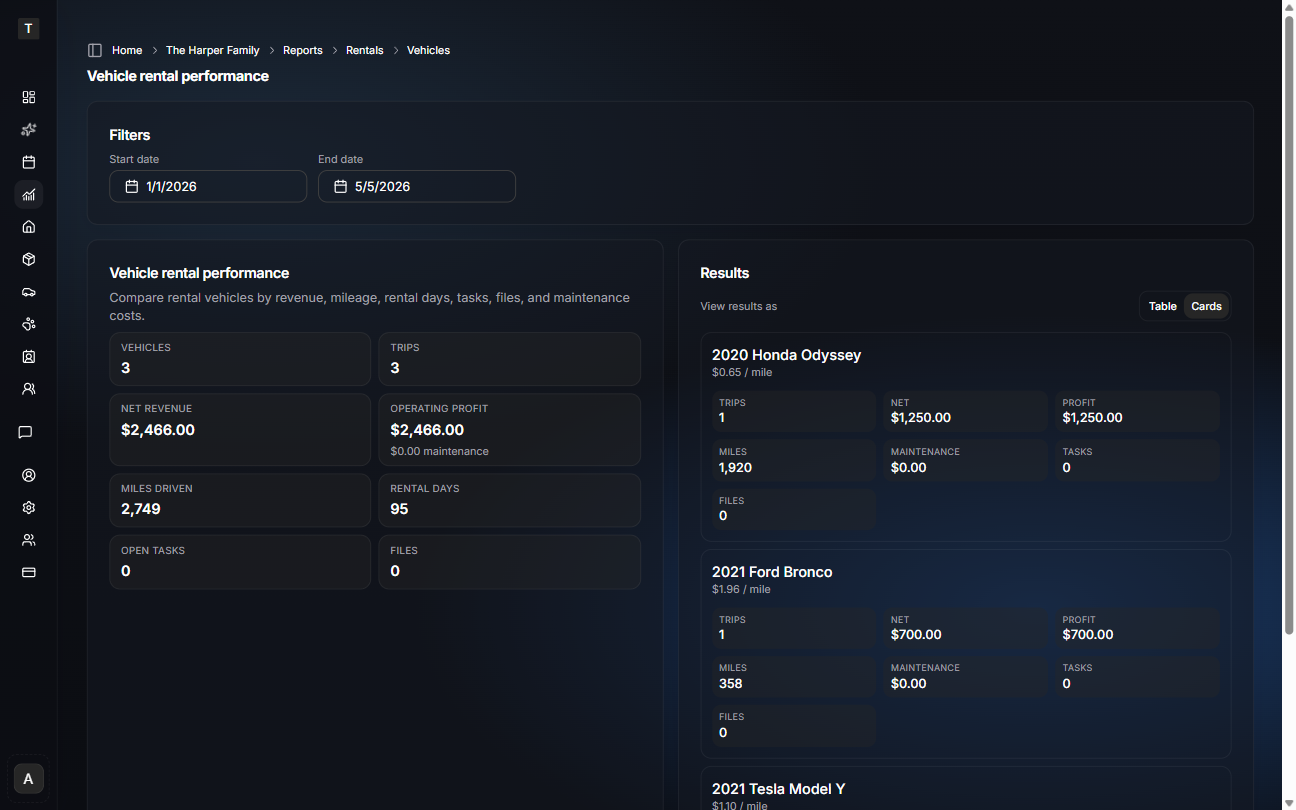
You can review:
- trip count
- gross revenue
- net revenue
- maintenance costs
- operating profit
- miles driven
- rental days
- revenue per mile
- open rental-linked tasks
- attached files
Use the report when you want to understand which vehicles are making money, which ones are creating the most follow-up work, and whether maintenance costs are changing the real performance of the fleet.
Copilot examples
Once trips, files, tasks, mileage, and maintenance history are in iMaintain, Copilot can answer structured rental questions from your records.
Try asking:
- Which vehicle was least profitable this quarter?
- Compare my rental vehicles by revenue per mile.
- Which cars have open rental tasks?
See Copilot for vehicles for more rental reporting examples.
Copilot is best for structured rental reporting questions such as revenue, maintenance costs, operating profit, mileage, rental days, revenue per mile, task counts, and file counts. For deeper document-level questions, attach the relevant inspection photos, receipts, invoices, and trip documents so Copilot has more context to use.
What vehicle rentals do not replace
iMaintain does not replace Turo, booking platforms, payment processing, guest messaging, insurance workflows, or tax/accounting software.
Use iMaintain to keep the operating record around each vehicle organized: trips, mileage, maintenance, files, photos, tasks, costs, and long-term history. Your booking and payment workflows can stay in the platforms you already use.