

Overview
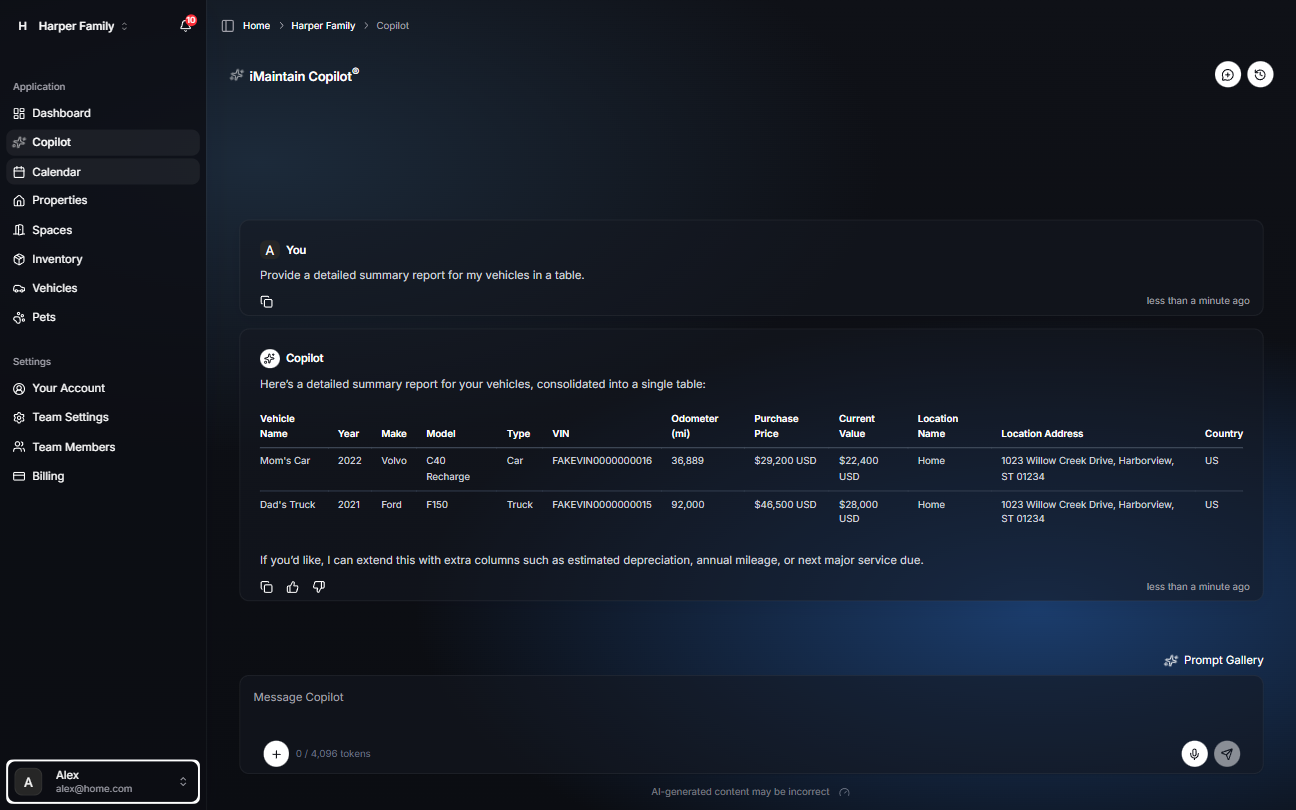
iMaintain Copilot can help you work faster by using your vehicle context—details, schedules, reminders, history, files, and notes—to answer questions and generate summaries.
This is especially helpful when you want a quick report without clicking through multiple pages.
What you can ask Copilot
- Reports: “Give me a detailed summary report for my vehicles.”
- Maintenance: “What maintenance is due soon for Dad’s Truck?”
- History: “What did we spend on oil changes for this vehicle last year?”
- Records: “Do we have the last service receipt for this vehicle?”
- Planning: “Suggest a recurring maintenance plan for a 2021 F-150.”
- Rental performance: “Which vehicle was least profitable this quarter?”
- Rental mileage: “Compare my rental vehicles by revenue per mile.”
- Rental follow-up: “Which cars have open rental tasks?”
- Rental costs: “How much maintenance cost is tied to my rental vehicles?”
- Rental files: “Which trips have files attached?”
- Rental miles: “Which vehicle had the most rental miles this month?”
Tips for better answers
- Name the vehicle (or ask from the vehicle page when possible).
- Ask for the format you want (summary, checklist, or table).
- The more you keep files and history up to date, the more useful Copilot becomes over time.
- For rental questions, keep trips, mileage, revenue, costs, files, and tasks up to date.