


For landlords
The maintenance record and rental history every property deserves
Sound familiar?
Rental properties get harder to manage when information is scattered
Each property has its own history, vendors, and moving parts. Without a system it all ends up in your head or lost in email.
Without iMaintain
The appliance repair from Oak Ave is buried in a 2024 email
HVAC history for Maple St mixed with the other properties
Move-in photos, lease files, and tenant notes are scattered
Same repair comes up again with no idea what was tried or cost
Tax season: scrambling to find which invoices belong to which property
With iMaintain
Apex Appliance attached to Oak Ave with all jobs on record
Each property keeps its own history — nothing bleeds across addresses
Rental periods show the tenant, files, photos, and open tasks together
Timeline shows the same issue in 2024 and 2025 and what it cost both times
Invoices organized by property — export any time
See it in action
A quick walkthrough for landlords
What's inside
A rental workflow built into each property record
iMaintain does not try to replace rent collection or property management software. It gives landlords the missing system for rental maintenance, records, files, tasks, and history.
Maintenance schedules & service history
Recurring tasks, seasonal upkeep, and repair history tied to each address — not scattered across emails and texts.
Vendor tracking
Which contractor did what, when, and for how much — with invoices, notes, and photos kept on the property record.
Rental periods & contacts
Current, upcoming, and past tenant or guest stays with dates, status, rate, deposit, and linked contact details.
Revenue & deposits
Track rental amount, frequency, deposits held, retained deposits, fees, reimbursements, and adjustments.
Rental & maintenance tasks
Create make-ready, repair, inspection, and cleaning tasks from the Rental or Maintenance view and keep them linked to the right stay.
Documents & photos
Attach leases, agreements, move-in photos, damage photos, and inspection records.
Portfolio performance
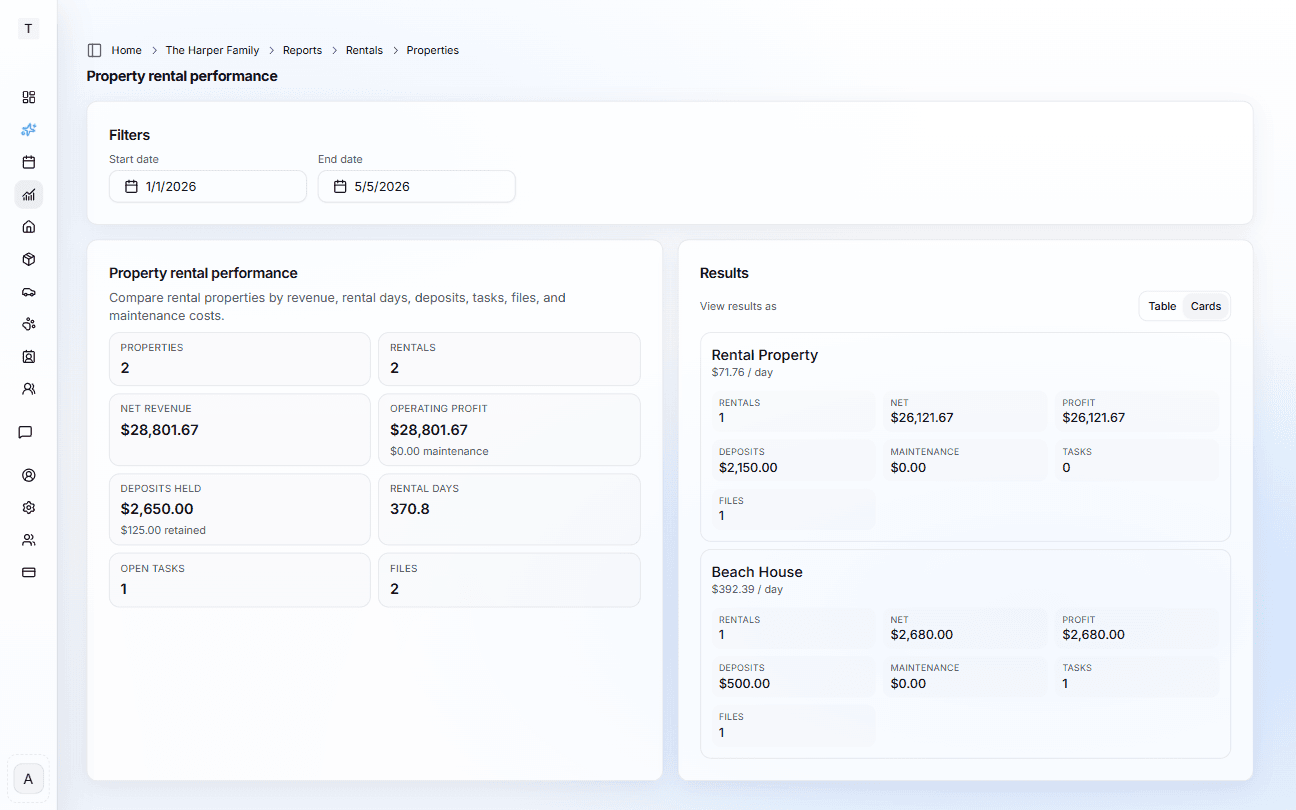
Compare properties by rental count, gross revenue, net revenue, maintenance cost, operating profit, and rental days.
Public message forms
QR codes for your rentals
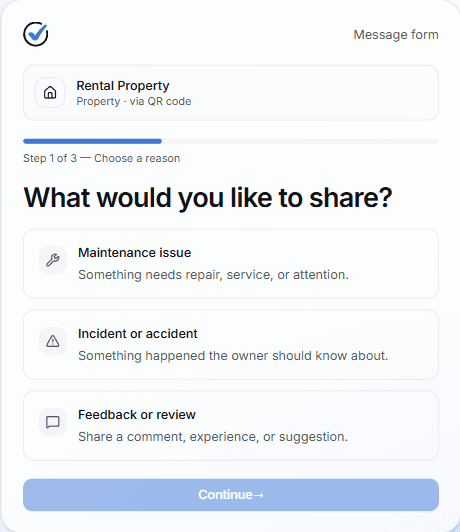
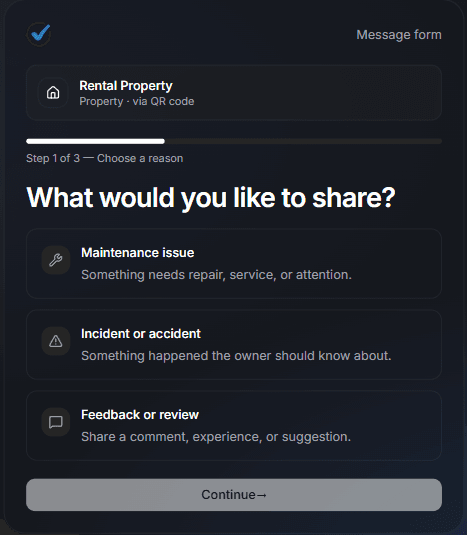
Every property can now generate a public QR code you can print and place inside the unit. Tenants and guests scan it to send you a message directly — no app, no account, no text thread required. They choose what they're reporting (maintenance issue, incident, or feedback), fill out a short form, and attach up to three photos or PDFs. It lands in your iMaintain Inbox, linked to the property it came from.
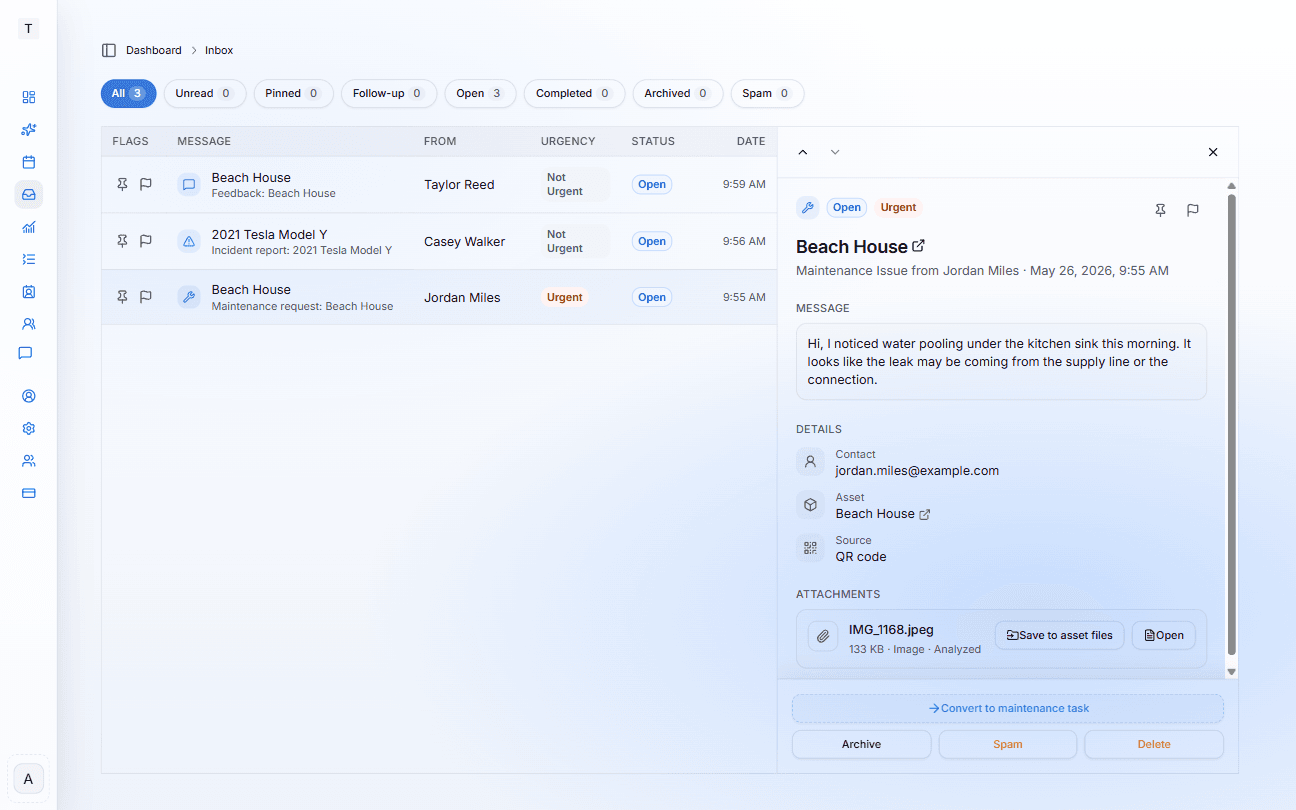
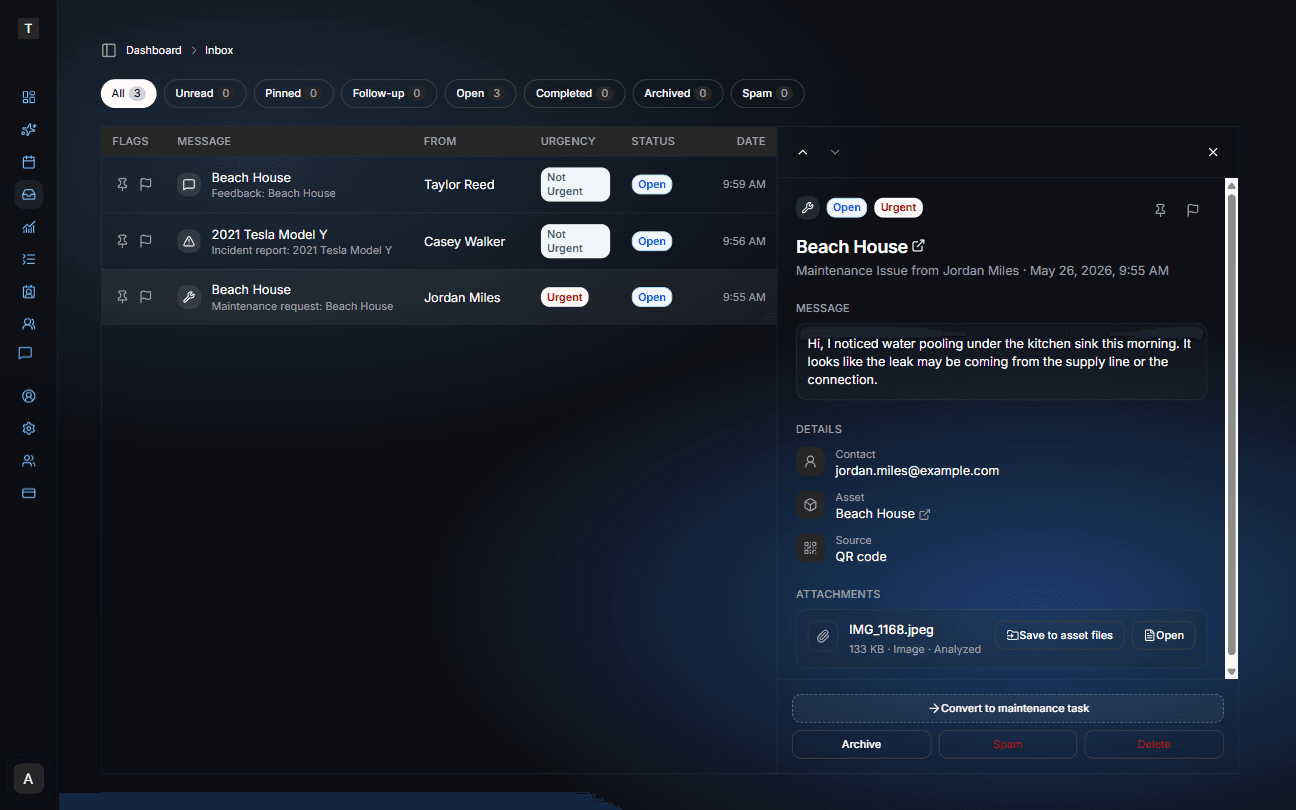
From the Inbox you can review the message, assess urgency, save attached photos directly to the property's file library, and convert maintenance requests into trackable tasks — all without leaving iMaintain.
You can also forward contractor invoices and service receipts directly to your Inbox by email — everything lands in one place regardless of how it was sent.
Tenants scan, you receive — everything lands in one place.
Email forwarding
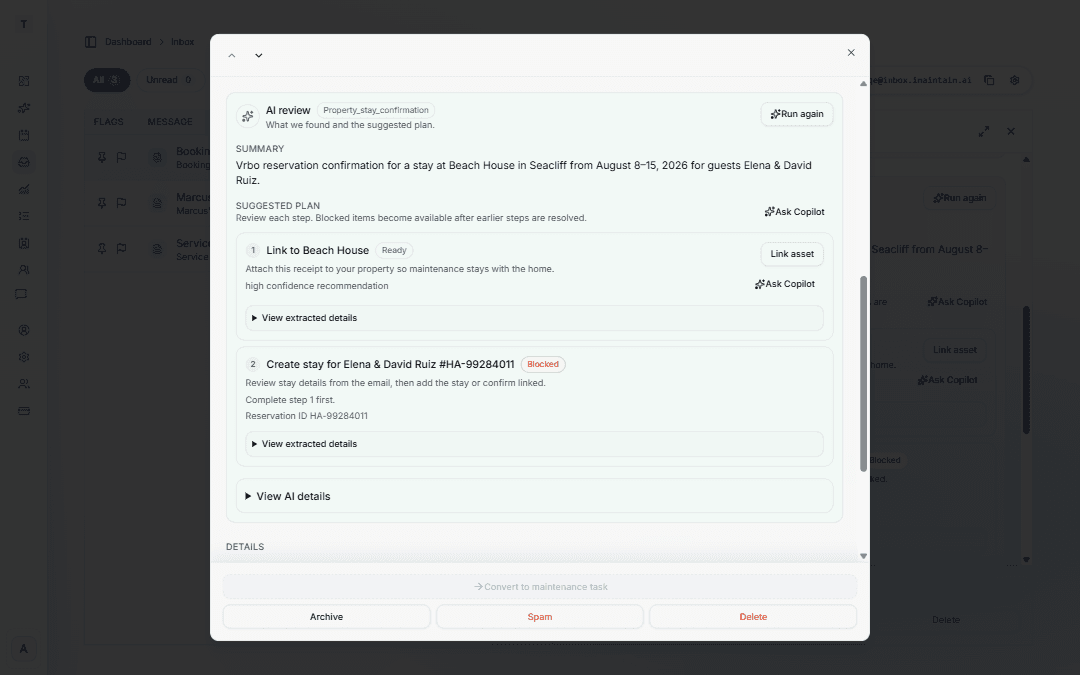
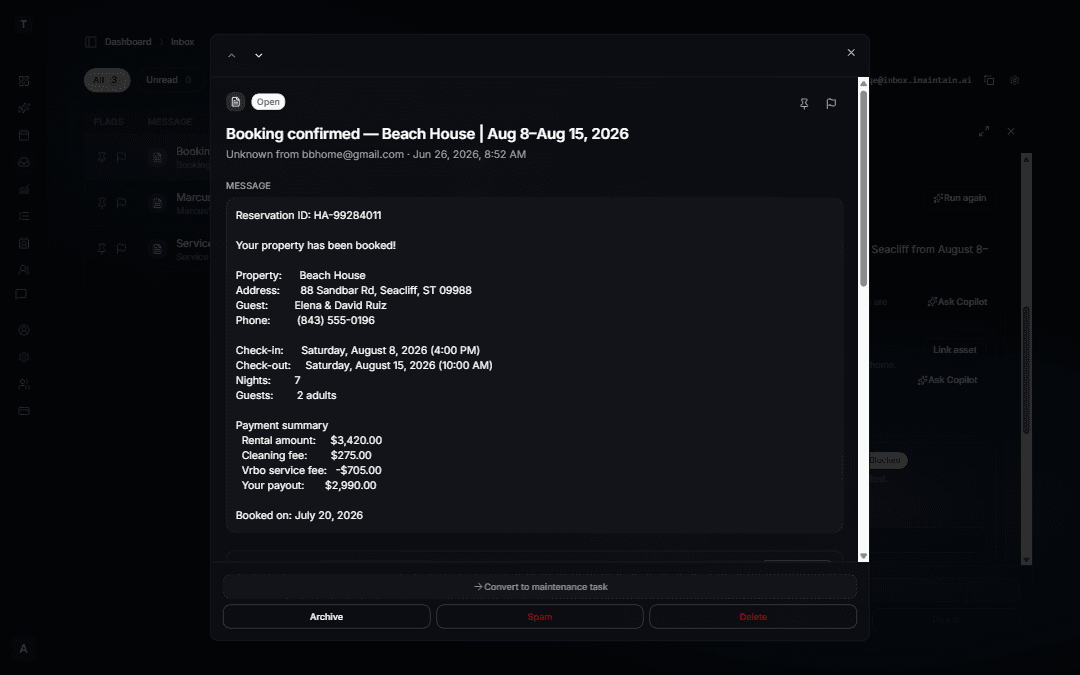
Forward booking confirmations — stays organized on the right property
Forward a VRBO, Airbnb, or direct booking email and iMaintain pulls out the guest, dates, reservation ID, and payout — then suggests linking the property and adding the stay. You review the prefilled rental record and save when it looks right.
Re-forward an updated confirmation and iMaintain matches by reservation ID to update without creating a duplicate stay. When two similar properties match, you pick the correct one before the stay is created. Cancel emails follow the same review-and-confirm flow.
Nothing saves automatically. You confirm each step before anything is added to your portfolio.
How setup works
One system for every property in your portfolio
Start with one address. Build history around it. Add more properties without losing context or starting over.
Add your rental properties
Enter each address, set the property usage to rental, and keep every record tied to the right property from day one.
Add rental periods and contacts
Track current, upcoming, and past tenant or guest periods with dates, status, rate, deposit, and contact details.
Track work, vendors, and files
Create rental tasks, log repairs, attach agreements and photos, and save vendor contacts on the property record.
See history and plan with context
Reports show repeat issues, vendor performance, rental revenue, deposits, maintenance costs, and the files tied to each rental period.
The history grows more valuable with every job you log.
What it looks like
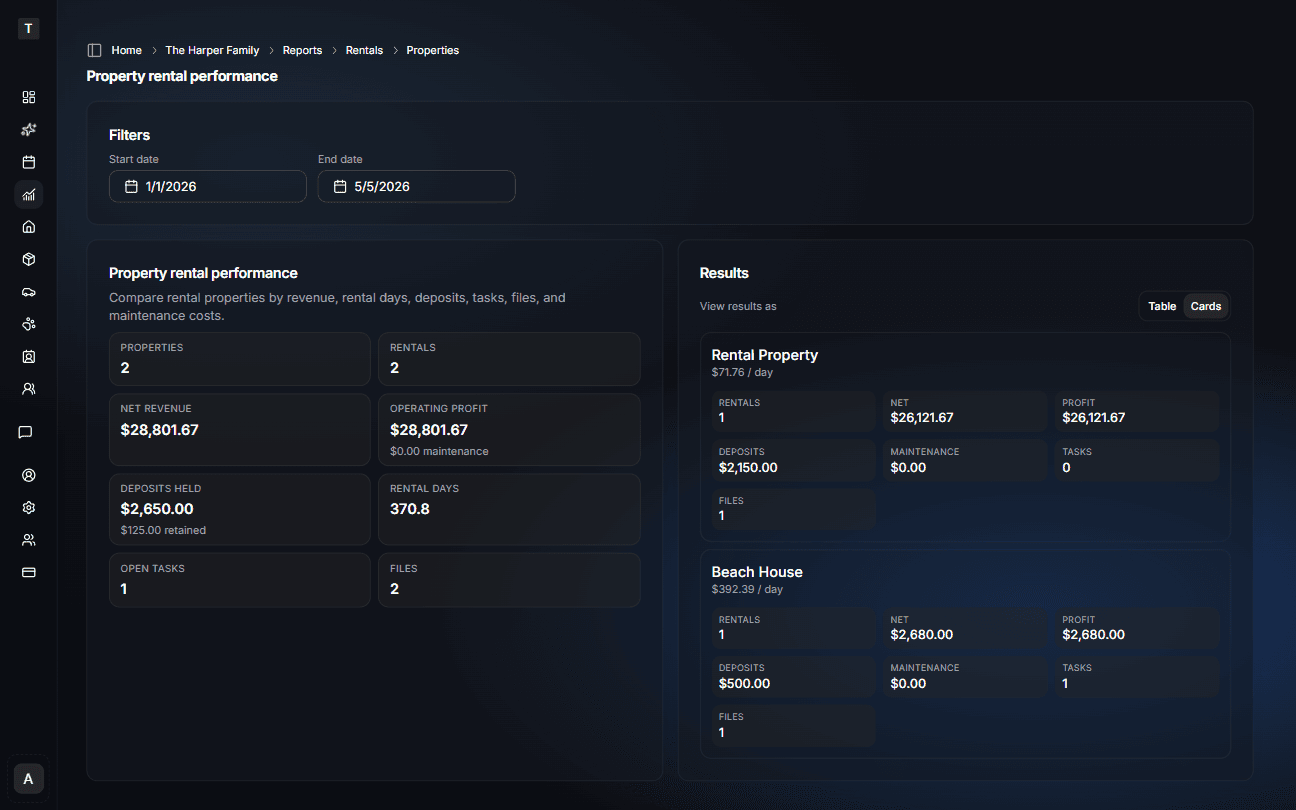
Portfolio reporting without a custom spreadsheet
Revenue, deposits, and operating costs by property — updated each time you log a rental period or service job.
What you manage
More than rent and leases — everything that belongs to a rental property
Maintenance schedules
Recurring inspections, seasonal tasks, and upkeep tied to each address — history that survives turnovers.
Vendor history
Who did the work, when, and what it cost — searchable by property even as tenants or managers change.
Rental periods
Current, upcoming, and past rentals with tenant or guest context.
Files and documents
Invoices, warranties, rental agreements, photos, and inspection reports tied to the property or rental period.
Cost tracking
Total spend per property per year with context for every item.
Property timeline
A record that grows more valuable over time
Every job you log becomes part of a story — how well you care for the property, what it costs to keep it reliable, and how tenants experience living there. That history pays off at renewal time, during turnovers, and when it is time to refinance or sell.
Feb 2024
HVAC tune-up
Air Pro Co. · $185 · pre-season service
Jun 2024
Move-in photos uploaded
Living room, kitchen, bath · rental period attached
Sep 2024
Dishwasher repair
Apex Appliance · $265 · inlet valve replaced
Mar 2025
Dishwasher repair
Apex Appliance · $310 · drain pump replaced
Aug 2025
HVAC filter and check
Air Pro Co. · $195 · all clear
Oct 2025
Tenant turnover prep
Paint touch-up, cleaning, smoke detector check · $1,080
Feb 2026
Roof and gutter inspection
Peak Roofing · $240 · photos attached
Spot repeat issues
Appliance repaired twice in 6 months — worth evaluating replacement vs ongoing repairs.
Evaluate vendor value
Apex Appliance has done repeat work here. Cost history and notes help decide if they are worth keeping.
Protect tenant experience
Proactive maintenance and clear records reduce surprises for tenants and support smoother renewals.
Strengthen resale and refinance conversations
When lenders, buyers, or inspectors ask about major systems, you can show exactly what was done, when, and by whom.
Ask Copilot
Ask about maintenance, history, and performance
When was the HVAC last serviced at Oak Ave?
Serviced June 12, 2025 by Air Pro Co. Full inspection and filter change completed for $210. Next service due June 2026.
Which of my properties has the most overdue maintenance?
Maple St currently has 4 overdue tasks: gutter cleaning, dryer vent cleaning, smoke detector check, and front step repair.
What have I spent on repairs at Maple St this year?
$2,340 across 6 repair jobs — largest items were dishwasher replacement at $920 and roof leak repair at $610.
Which rental property performed best this quarter?
Oak Ave Duplex leads with $7,820 net revenue and $6,940 operating profit across 3 rentals.
How much deposit money is currently tracked?
$4,200 in deposits held across active property rentals, with $650 retained for documented cleaning and repair follow-up.
Which properties have open rental tasks?
Maple St has 2 open tasks: turnover cleaning and appliance inspection. Cedar Condo has 1 open repair follow-up.
Why landlords choose iMaintain
Most property management tools were not built for small landlords
Most tools
Focus on tenant management — rent, leases, screening — with basic maintenance tracking tacked on
Built for large property management companies with 100+ units
Cost $100–500/month for enterprise features small landlords do not need
Rental files, tasks, deposits, and maintenance costs still end up scattered across folders and email
iMaintain
Structured rental reporting — ask "Which property performed best this quarter?" and get answers from your records
Built for rental maintenance and records — property timelines, rental periods, deposits, tasks, files, vendor evaluation, and cost pattern recognition
Pricing that matches your growth — start on Essential or Plus, upgrade to Business when you need team features and higher limits
Your entire operation — rental properties, personal home, vehicles, and equipment in one system
RECOMMENDED PLAN
Built for landlords — Business plan
The right plan to track rental periods, vendor history, documents, and costs across your portfolio — starting at $49/mo.
Business
Starting point — scale with add-ons as your portfolio grows.
- Up to 5 users (owner, property manager, team)
- 10 vehicles, 10 properties, 1,000 assets to start
- Multiple teams — separate property and owner views
- Task assignment with notifications
- Role-based permissions
- Full Copilot access
- Priority support
Add-ons scale with your portfolio
If the Business defaults are not enough — more properties, more storage, more team members — add-ons let you expand exactly what you need without moving to a different plan.
Managing 3–5 properties solo?
The Plus plan at $19/mo covers up to 5 properties without team features. A good fit if you manage alone and do not need multi-user access.
14-day free trial
Start with a 14-day free trial on the Essential plan — no credit card required. Add your properties, rental periods, and records, then upgrade to Business when you are ready.
FAQ
Frequently asked questions
What if I only have 2 rental properties?+
Start with the Essential plan at $9/mo — it covers up to 2 properties. When you reach 3–5 properties, the Plus plan at $19/mo covers up to 5 properties. As your portfolio expands further and you need team features, upgrade to the Business plan at $49/mo for up to 10 properties and multi-user access.
How does this compare to other property management tools?+
Most property management tools focus on tenant operations — rent collection, lease tracking, tenant screening, and booking operations. iMaintain focuses on property intelligence: maintenance history, vendor tracking, rental periods, linked files, tasks, cost visibility, and AI that answers questions about your portfolio. Many landlords use both: a property management or accounting tool for operations and books, iMaintain for the property itself.
Can I track tenant turnover and prep checklists?+
Yes. Use one-time rental tasks for make-ready work, cleaning, inspections, repairs, and follow-up items. You can attach photos, agreements, notes, and vendor records to the property or the specific rental period. Structured checklist templates are planned as a follow-up.
Does this replace my accounting software?+
No. iMaintain tracks rental periods, rental revenue, deposits, maintenance costs, files, tasks, and property history so you can understand each property. For full accounting, reconciliation, expense categorization, and tax filing, continue using QuickBooks or your preferred accounting software.
Can Copilot answer rental performance questions?+
Yes. Copilot can answer structured reporting questions like which property performed best, how much deposit money is tracked, which rentals have open tasks, and how revenue compares with maintenance cost. Searching inside leases, incidents, claims, and narrative documents is the next indexing layer.
What if I have 15 rental properties?+
If you are managing around 15 properties, the Business plan is still the right foundation. We can extend your property limits with add-ons or a tailored configuration — contact us and we will size your account to match your portfolio.
Can I track my personal home too?+
Yes. Your property capacity covers both rental and personal properties. Track your primary residence, vacation home, and rental portfolio all in one system.
Can I switch plans as my portfolio grows?+
Absolutely. Upgrade or downgrade anytime. Your full property history and records stay intact regardless of which plan you are on.
Built on trust
Your data stays yours.
Four promises that don't change — no matter how you use iMaintain or how long you stay.
Privacy by default
Records kept secure, never sold or shared with advertisers.
Export anytime
Download your full records as a human-readable ZIP. No lock-in.
AI that doesn't train on you
Copilot uses your data to answer questions. It never trains on it.
Controlled sharing
Role-based access. Invite family or teammates with clear permissions.
Get started
Stop keeping it all in your head
One avoided repair easily pays for years of iMaintain. Start free and let your ownership record build itself from day one.
14-day free trial · No credit card · Export your data anytime