


Belongings & inventory in iMaintain
Know what you own, what it's worth, and where the proof is
Road bike
$3,200 · Receipt + photos attached.
What's tracked
Everything connected to your belongings
From appliances and electronics to collections and equipment — organized, searchable, and ready when you need it.
Core details for every item
Item details & value
Model numbers, serial numbers, purchase price, and current estimated value.
Warranties & receipts
Coverage dates, purchase receipts, and service agreements — all attached.
Maintenance & service
Servicing history and schedules for items that need regular care.
Photos & documents
Visual proof of condition, damage, and original packaging for claims and resale.
What it looks like
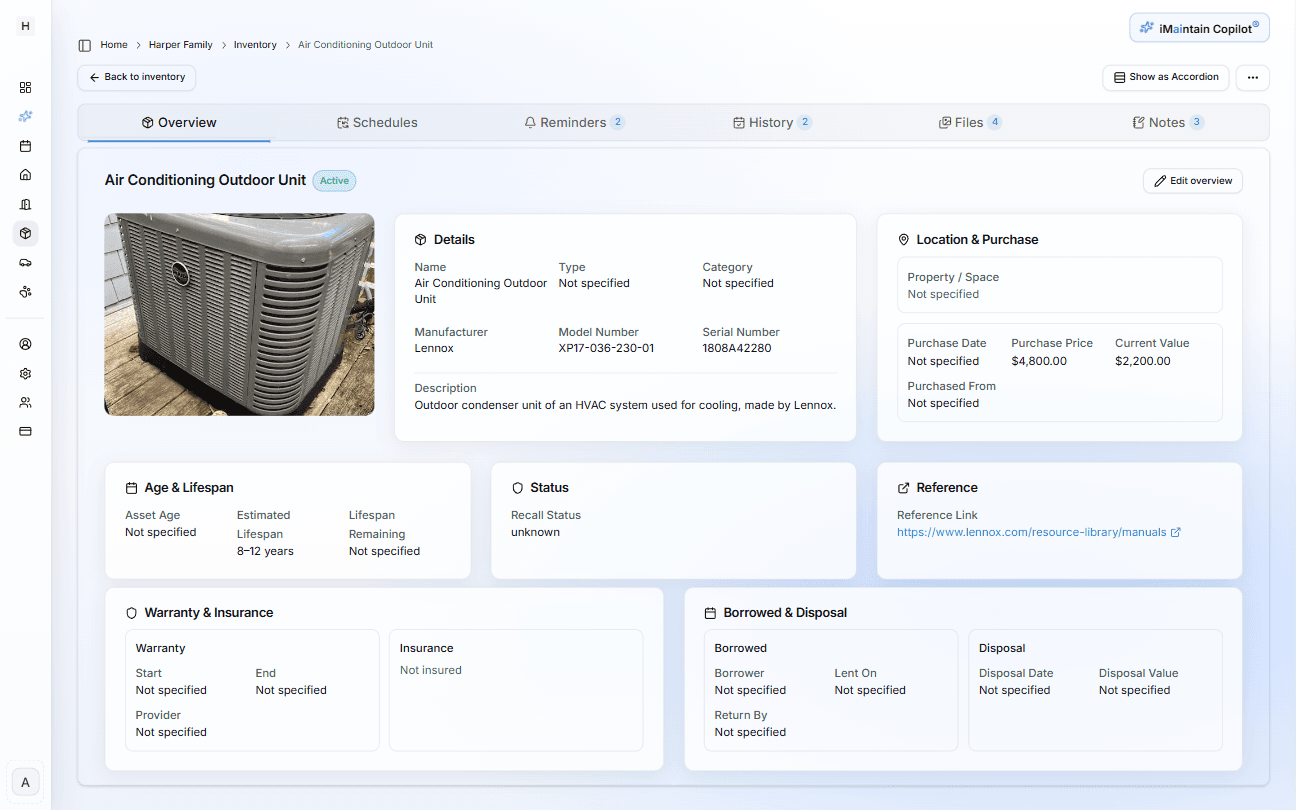
The belongings workspace gives you a searchable grid of items with photos, categories, and values — click into any item to see its receipts, warranties, documents, and history in one place.
How setup works
Add items in minutes
Start with the basics and build out the record over time. There is no required format — just capture what you know.
Name the item and add key details
Add a name, category, brand, model, and serial number. As much or as little as you have.
Record the purchase and value
Log the purchase date, purchase price, and store or seller — useful for insurance and resale.
Attach documents and photos
Upload the receipt, warranty card, and a photo of the item in its current condition.
Photos with timestamps are especially useful for insurance claims.
AI suggests care reminders
For items that benefit from maintenance — appliances, tools, equipment — AI recommends schedules based on the item type and usage. You review and approve before anything is added.
Ask Copilot
Questions about your belongings, answered from your records
Ask in plain language. Copilot searches your actual inventory — not the internet.
Is the dishwasher still under warranty?
Yes — purchased March 2022 with a 3-year manufacturer warranty. It's covered until March 2025. Warranty card is attached.
What high-value electronics do I have documented?
Found 6 items over $500: MacBook Pro, Sony TV, Nikon camera, iPad, Bose headphones, and the espresso machine. All have receipts attached.
What did I pay for the road bike originally?
Cervelo R5 — purchased June 2020 from Cycle Nation for $3,200. Receipt is attached. You've logged a tune-up in 2022 and new tires in 2023.
Which items are due for servicing this month?
Three items: whole-house generator (annual service), HVAC filter replacement, and water softener salt check.
Why it matters
Documentation that pays off when it counts
- File an insurance claim with proof — not a best-guess estimate of what you owned
- Never lose a warranty because the paperwork got thrown out
- Know exactly what something cost when it comes time to sell or replace it
- Track condition and maintenance for high-value or frequently used items
- Share inventory access with a partner, business partner, or property manager
Insurance claims
When you need to file a claim, having photos, receipts, and serial numbers documented in advance makes the process significantly faster and more accurate.
Home inventory
A complete home inventory is one of the most recommended things you can do to protect your assets — and one of the least done. iMaintain makes it easy to build one over time.
Resale confidence
Selling secondhand is easier when you have the original receipt, service history, and photos. Buyers pay more for well-documented items.
Ask external AI
Find out what AI says about iMaintain.
One click opens a prefilled prompt in your favorite AI assistant. Use it to see how independent models describe iMaintain's features and fit.
Built on trust
Your data stays yours.
Four promises that don't change — no matter how you use iMaintain or how long you stay.
Privacy by default
Records kept secure, never sold or shared with advertisers.
Export anytime
Download your full records as a human-readable ZIP. No lock-in.
AI that doesn't train on you
Copilot uses your data to answer questions. It never trains on it.
Controlled sharing
Role-based access. Invite family or teammates with clear permissions.
Get started
Stop keeping it all in your head
One avoided repair easily pays for years of iMaintain. Start free and let your ownership record build itself from day one.
14-day free trial · No credit card · Export your data anytime