

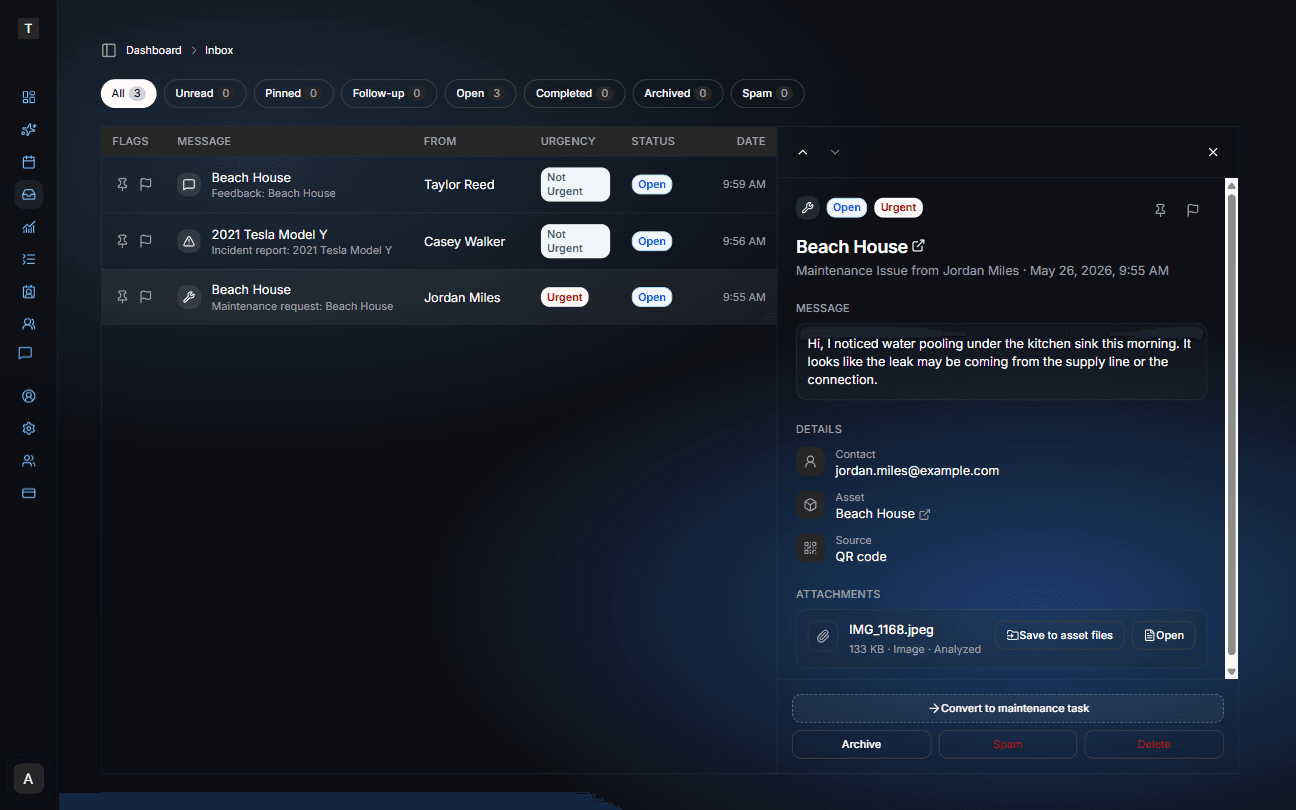
This release introduces end-to-end QR communication for your assets — from physical labels to public message forms to a dedicated Inbox.
One place for every message sent about your assets
All messages submitted via public QR forms now arrive in your Inbox, organized by urgency and status. Each message shows the asset it came from, the sender, and any attached files — which are automatically analyzed by Copilot to summarize their contents and inform urgency assessment.
From the Inbox you can:
- Pin or flag messages for follow-up
- Convert a maintenance request directly into a trackable maintenance task, with attachments carried over
- Save attachments to the related asset's file library — individually or all at once — after reviewing them
- Archive, mark as spam, or delete to keep your Inbox clean
- Filter by status: Unread, Pinned, Follow-up, Open, Completed, Archived, and Spam
Once attachments are saved to an asset's file library they become part of your Copilot knowledge base — meaning you can ask Copilot questions about submitted photos, inspection records, and documents just like any other file associated with that asset.
Email forwarding to your Inbox is now live — see the Email Forwarding release →
Update: Inbox now includes AI review and suggested plans for forwarded receipts and booking confirmations.